How people agree to texts from Rinqo
Last updated: November 13, 2026
Rinqo LLC has two text programs, each on its own number, and texts only people who agreed to that program first. A caller who places a pickup order by phone with a restaurant that uses Rinqo may be offered, on the call, one text from Rinqo when the order is ready; those texts come from +1 (866) 591-0101. The restaurant owners, managers and staff who use the Rinqo dashboard at app.rinqo.ai agree to their texts on one of two web forms inside the dashboard; those texts come from +1 (609) 598-9864. No other text goes to a restaurant's callers: the payment link listed for the Pro plan, and the payment link and confirmation texts in the produced sample call at rinqo.ai/demo, are not live and are not covered here. Calls and the dashboard are not public, so this page gives the words of each consent, a plain copy of each dashboard form, and screenshots. This page is a copy for reference, not a working form. Nothing on it signs anyone up. Texts are optional and never a condition of purchase.
Order-ready texts to restaurant callers
Rinqo answers the phone for independent restaurants. When a caller places a pickup order with Rinqo's automated phone host, the host may offer one text from Rinqo when the order is ready. Rinqo's phone host asks for this consent on the call, in one short yes or no question, and Rinqo writes the text, which opens with Rinqo's name, and sends it from its own toll-free number, +1 (866) 591-0101. Restaurants do not write or send these texts, cannot text from this number, and get no list of who agreed; their order screen shows only, for each order, whether Rinqo will text the caller. Where: on the phone call, right after the order is placed. Who: the caller, for the number on their order. Nothing is texted unless the caller says yes to the question below, and the order stands whatever the answer.
Rinqo hostYou're all set. Your order is in, and the restaurant will have it ready as soon as it can. Would you like a text when your order is ready?
CallerYes.
Rinqo hostGot it. Is there anything else I can help with?
If the caller asks about the text, the host explains that it is one text from Rinqo, the service that answers the line, sent when the restaurant marks the order ready. The terms for these texts are in our Terms of Service and Privacy Policy. The text goes only to the number on the caller's order: the number they are calling from, or a number they gave on the call and heard read back. A plain yes, such as yes, yeah, sure or okay, is a yes. If the answer is unclear, the host asks once: "Just to check, is that a yes to the text?" Any answer other than a yes then means no text. After a no, the host says: "No problem, no text. Your order is still in." The host offers the text once per order, only for pickup orders, and never to a number that has asked Rinqo to stop, unless that number later texts START or UNSTOP.
How the yes is kept
Calls on lines Rinqo answers are recorded and transcribed, and the recording itself is kept for 90 days. Rinqo saves each yes as a consent record with the order: the date and time, the restaurant and the order, the phone number to text, the version of the words the host used, and the question and the answer as transcribed. Rinqo keeps each record for four years after the text, uses it only to send that one text and to show that the caller agreed, and never sells, rents or shares it. A yes for an order that is never marked ready is deleted after 90 days. A no is kept only as a mark on the order, without the phone number.
The text
When restaurant staff mark the order ready, Rinqo sends one text from +1 (866) 591-0101. Rinqo writes every word; the restaurant cannot change it. Riverside Pizzeria is Rinqo's demo restaurant; a real text names the restaurant the caller ordered from:
Rinqo: Your order from Riverside Pizzeria is ready for pickup. Reply STOP to opt out.
Message frequency: one text per order, only for an order the caller asked about on that call. Rinqo sends callers no marketing and no links, and texts a caller again only if they ask on a later call. A reply of HELP gets this text:
Rinqo: Order-ready texts, one per order you ask for on a call. Help: support@rinqo.ai. Msg & data rates may apply. Reply STOP to opt out.
Stopping these texts
Message and data rates may apply. Reply STOP to a text from +1 (866) 591-0101 to stop all texts from that number, or HELP for help. The phone carrier confirms a STOP with its own reply. Every restaurant's order-ready texts come from this one Rinqo number, so a STOP stops them for every restaurant. Reply START or UNSTOP to receive them again. You can also tell the host on a later call, or write to support@rinqo.ai, and Rinqo stops texting your number; on a call the host answers: "Okay. Rinqo will not text this number." Wireless carriers are not liable for delayed or undelivered messages. The terms for these texts are in section 6 of the terms of service, and how Rinqo keeps your number and your consent is in the privacy policy.
1. Call alerts and account notices
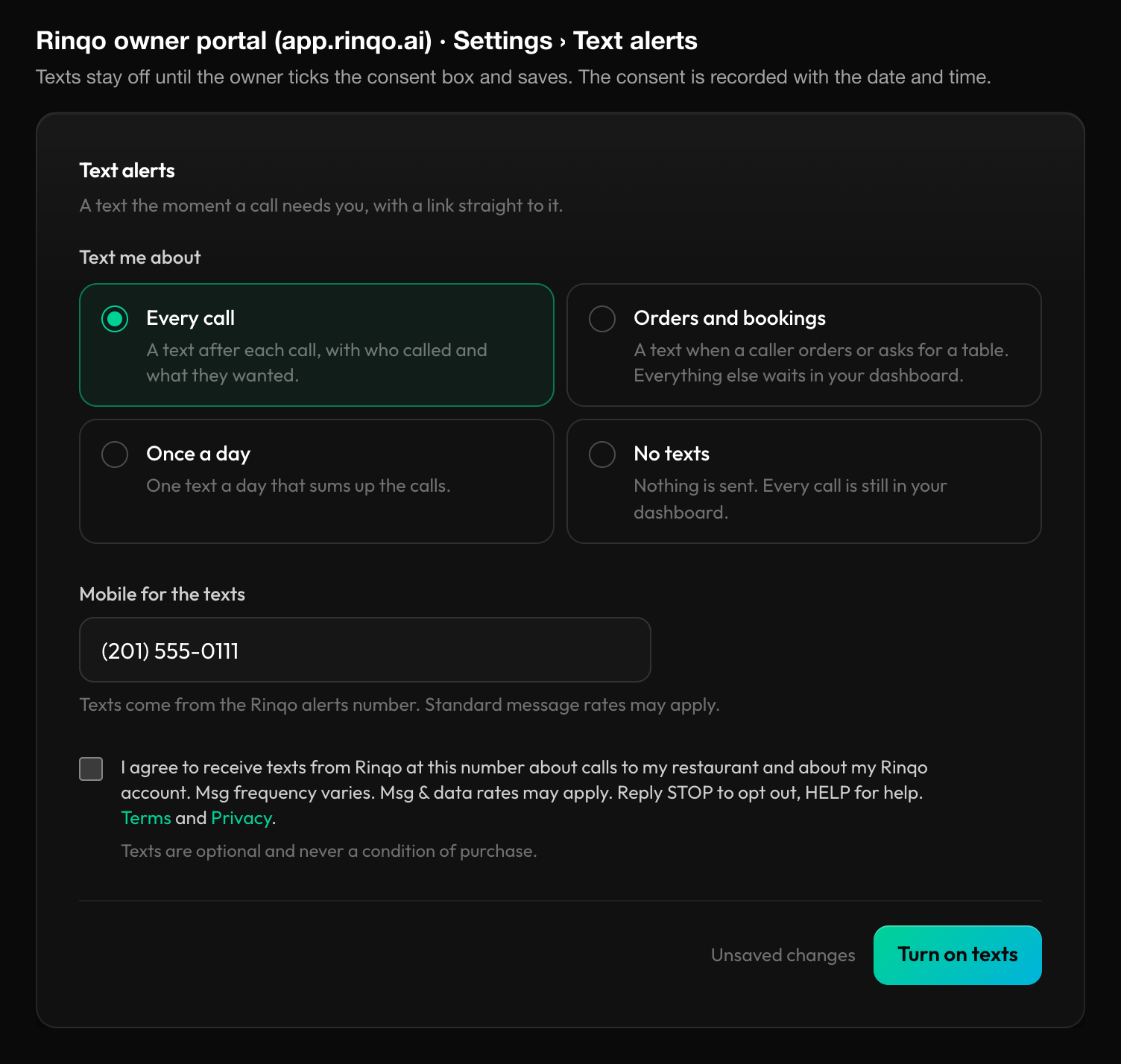
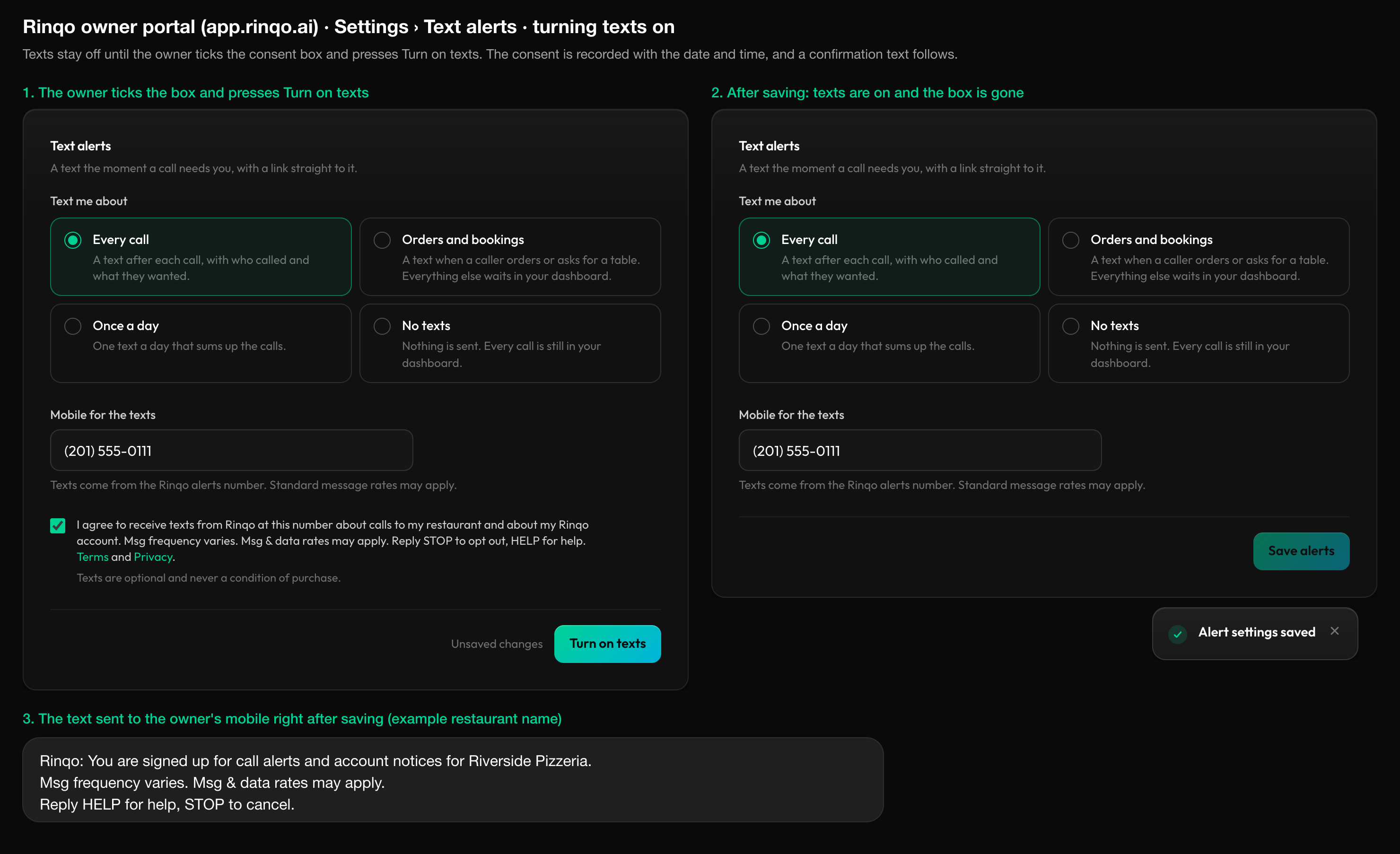
Where: the Settings page of the dashboard, in its Text alerts section. Who: the restaurant owner or a manager. The box starts unticked, and saving is refused until it is ticked. The time of consent is recorded.
After the owner or manager presses Turn on texts, the settings save and this confirmation text is sent, naming their own restaurant (Riverside Pizzeria is an example):
Rinqo: You are signed up for call alerts and account notices for Riverside Pizzeria. Msg frequency varies. Msg & data rates may apply. Reply HELP for help, STOP to cancel.
2. Sign-in codes
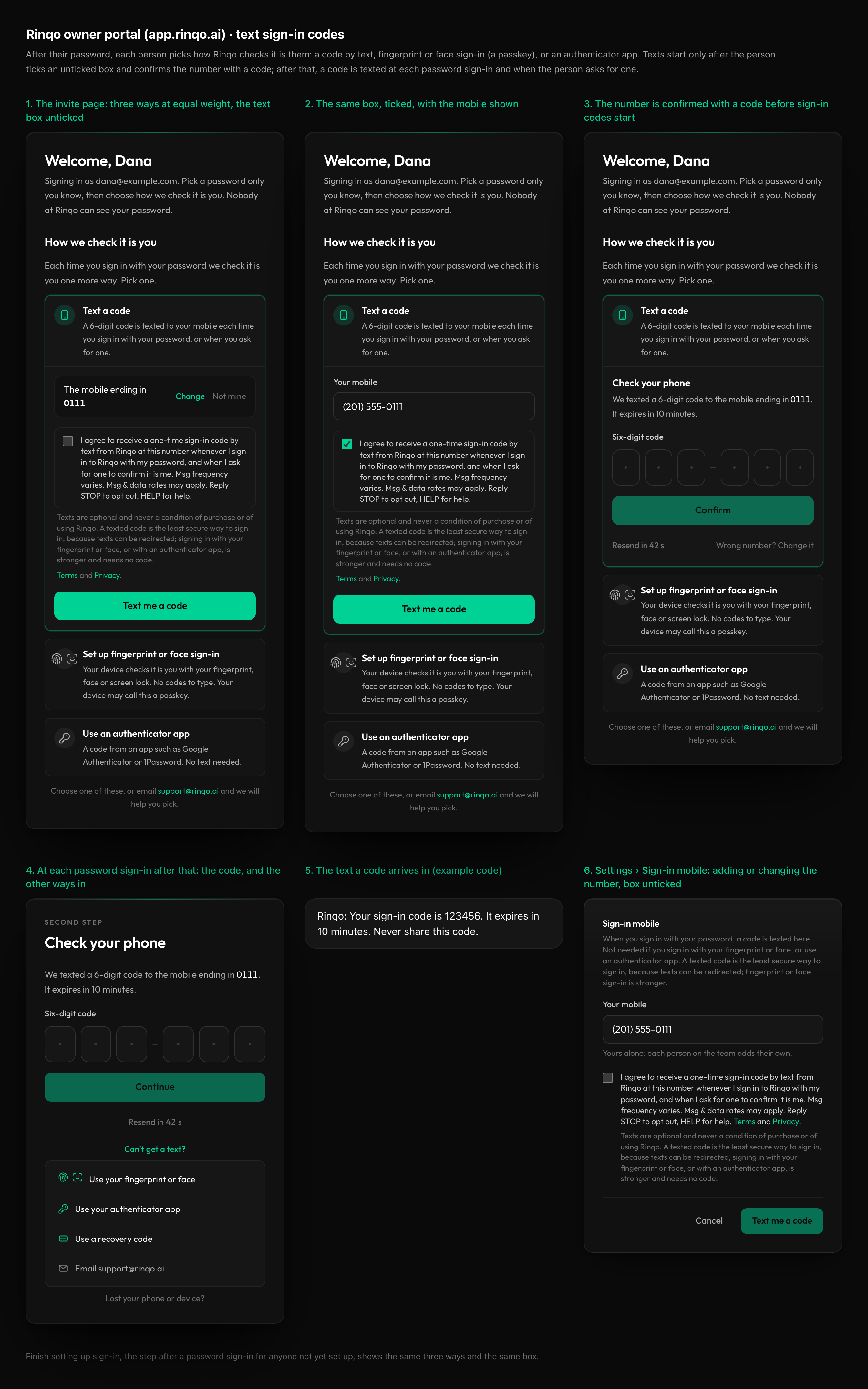
Where: the invite page where a new team member sets a password, the Finish setting up sign-in page after a password sign-in, and the Settings page, in its Sign-in mobile section. Who: anyone on a restaurant's team, each for their own sign-in. The box starts unticked, and no code is sent until it is ticked. The wording agreed to and the time are recorded. The copy below is the Settings version; on the invite page and the Finish setting up sign-in page the same box, with the same wording, sits on a card titled Text a code.
After the person presses Text me a code, a code is texted to confirm the number. From then on, this text arrives each time they sign in with their password, and when they ask for one:
Rinqo: Your sign-in code is 123456. It expires in 10 minutes. Never share this code.
Texts are never required to sign in. Fingerprint or face sign-in, which a device may call a passkey, or an authenticator app works with no text at all.
Stopping texts to owners and their teams
Every text to owners and their teams comes from +1 (609) 598-9864. Message frequency varies, and message and data rates may apply. Reply STOP to any of these texts to stop them all, or HELP for help. Reply START to allow texts again: sign-in codes resume at once, and call alerts resume once they are turned back on in Settings. Help is also at support@rinqo.ai. The full terms for texts are in section 6 of the terms of service, and how mobile numbers are kept is in the privacy policy.